DELL V84RD Inspiron Ribbon Cable Touchpad 7590/7591
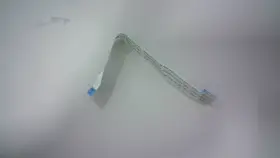
( Brand: Dell ), ( Manufacturer Part Number: V84RD ), ( Part Type: Touchpad Ribbon Cable )
Review DELL Inspiron 7590/7591 Ribbon Cable For Touchpad
Introducing the Dell V84RD ribbon cable, a crucial component designed specifically for the touchpads of the Inspiron 15 7000 Series models 7590 and 7591 from Dell. This replacement part is an essential addition to your laptop maintenance toolkit.
Measuring approximately 22.4 inches in total length, the Dell V84RD ribbon cable is meticulously crafted to meet the stringent quality standards of Dell. It features a flexible and durable design, ensuring smooth and reliable connectivity between the touchpad and the motherboard. The cable is composed of high-quality materials, ensuring excellent conductivity and resistance to wear and tear.
The Dell V84RD ribbon cable boasts a simple yet robust design, with a total of 12 pins arranged in a specific pattern. This pattern ensures seamless communication between the touchpad and the laptop's internal components. Each pin is carefully insulated to protect against accidental shorts or electrical interference, contributing to the overall reliability and longevity of the cable.
Installing the Dell V84RD ribbon cable is a straightforward process. Simply align the connector with the touchpad assembly and gently press it into place. The tactile feedback you'll feel as the connector locks into position confirms a secure and proper installation. This replacement cable is an excellent solution for users experiencing touchpad issues or those looking to upgrade their existing cable for enhanced performance.
In summary, the Dell V84RD ribbon cable is a high-quality and essential accessory for the Inspiron 15 7000 Series models 7590 and 7591. It offers durable, reliable, and flexible connectivity between the touchpad and motherboard, ensuring optimal touchpad functionality. Whether you're a power user, a casual user, or a tech enthusiast, this replacement cable is an indispensable addition to your laptop maintenance arsenal.
Pros and Cons of Buying a Dell V84RD Inspiron 15 7590/7591 Ribbon Cable for Touchpad
The Dell V84RD ribbon cable is a replacement part designed specifically for the touchpad of the Inspiron 15 7590 and 7591 models. This accessory can be particularly useful when the original cable becomes damaged or stops functioning. In this discussion, we will weigh the pros and cons of purchasing this part.
Pros:1. Improved functionality: A faulty touchpad cable can result in issues such as unresponsiveness or intermittent touch input. Replacing the cable with a new one can restore the touchpad's functionality, providing a smoother and more responsive user experience.
2. Cost-effective: Compared to purchasing a new laptop, replacing a single component like the touchpad cable can save you a considerable amount of money.
3. DIY repair: If you're comfortable with performing minor repairs yourself, buying a touchpad cable can be an excellent opportunity to practice your skills and potentially save time and money by avoiding professional repair services.
4. Availability: Dell offers replacement parts like the V84RD ribbon cable through their official website and authorized retailers. This makes it easy to obtain the part when needed.
Cons:1. Technical complexity: While some users may find the process of replacing a touchpad cable to be straightforward, others might find it challenging. Factors such as accessing the touchpad connector, properly aligning the new cable, and soldering connections (if required) can add complexity to the repair process.
2. Risk of damage: During the repair process, there's a risk of accidentally damaging other components or causing further issues. For example, you might unintentionally bend or break a connector, or inadvertently apply too much force when installing the new cable.
3. Cost of tools and supplies: To replace the touchpad cable, you might need additional tools and supplies, such as a soldering iron, solder, and a Phillips head screwdriver. These items could add to the overall cost of the repair.
4. Potential for compatibility issues: Although the Dell V84RD ribbon cable is designed specifically for the Inspiron 15 7590 and 7591 models, there is still a possibility of compatibility issues. For instance, the cable might not fit correctly, or it might not work with certain laptop configurations.
Conclusion:The decision to buy a Dell V84RD Inspiron 15 7590/7591 ribbon cable for touchpad repair depends on various factors, including your technical skills, budget, and willingness to take on a DIY project. If you're comfortable with performing the repair yourself and have the necessary tools, it can save you money and potentially improve the functionality of your laptop. However, if you're not confident in your abilities or prefer to avoid the repair process altogether, it might be more convenient to consider other options, such as professional repair services or purchasing a new laptop. Ultimately, weighing the pros and cons carefully can help you make an informed decision.
Recommendation:If you decide to pursue a touchpad cable replacement, ensure that you have a thorough understanding of the repair process and the tools required. Familiarize yourself with the steps involved in the repair, and consider practicing the process on an older or cheaper laptop if possible. Additionally, double-check that you're purchasing the correct part for your specific laptop model and that it's from a reputable source to minimize compatibility issues. Finally, consider the potential cost savings and the opportunity to gain valuable repair skills before making your purchase.
Details:
Listing is for the item only.: Brand Dell, MPN V84RD, Condition Open Box. Dell Inspiron 15 7590/7591 Ribbon Cable for Touchpad: Touchpad V84RD. No accessories, cables, manuals, etc included, unless stated otherwise in the listings .
FOR PART / COMPONENT LISTINGS: Part Conditions: All parts are pulled from tested working units New units, Open Box or Used units, unless stated otherwise in the listing. FOR LAPTOP BATTERY LISTINGS: Battery Conditions: All batteries are pulled from tested systems. Each condition has a range of battery health percentages. Kindly ensure that you thoroughly review the and access all available photographs prior to making a purchase decision.
New: 100%-90%. Item may show signs from previous installation.
part #: v84rd prices
- $10.00-$24.80
specifications compocables:
- brand: Dell
- mpn: V84rd
- part type: Touchpad Ribbon Cable
shipping compocables:
- service: Standard
- class: Standard
- type: Fixed
- cost: $6.00
- transit: 3-5 Days
returns compocables:
- policy: Returns Accepted
- time: 30 Days
- paid by: Seller
- method: Money back
seller compocables:
- # reviews: 157481
- rating: 98.1%
- city: Macedonia, Ohio
general compocables:
- Computers/Tablet's Networking > Computer Cables Connectors > Other Computer Cables
- condition: Open box
offer compocables:
- quantity: 1
- sold: 0
- options: Ship-to-home
- availability: In Stock
- started: July 11, 2025
payments compocables:
- credit card: Mastercard
- wallet: Google-pay
- other
Dell V84RD Is Similar To:
- Dell 03gpf4 3gpf4 Dc02c00al00 Latitude 5510 Series Led Video Cable Dp n L6-20 (28.1% similar) Condition: used...(May 24th, 2024)
- Dell Dc02c00em00 Hd5fx Latitude 5480 Series Led Video Cable Dp n L6-14 (29.7% similar) Condition: used...(May 25th, 2024)
- Dell Vjp3j Dc02c00k200 Latitude 5511 Series Led Video Cable Dp n L6-11 (34.4% similar) Condition: used...(May 25th, 2024)
- Dell 48570-379-02mx-a00 Mini Sas To Dual Power Cable T3600 T5600 T7600 T3f4v (34.3% similar) Power cord included no, warranty 30 day warranty. Quick features: technician notes. Don't buy new. It has been cleaned and passed our testing with no issues. Only genuine software installed. Please look at the specifications tab for more details. Indecent started out in 2017 with a...(May 26th, 2024)
- Dell P4904 Oem Poweredge 2800 Tbu Scsi Controller Cable (31.9% similar) Compatible Dell desktop systems genuine oem parts only. Power edge server 2800. Depart number: P4904. Buyer pays return shipping. W a r n y - I f o m n, no hassle 60 day warranty...(May 26th, 2024)
- Dell 6wh77 Oem Inspiron Mini Duo 1090 Docking Station Internal Duaghter Io (42.4% similar) This is the internal daughter Io circuit board, with SD card reader, USB ports, audio port, and network JR-45 port; for the inspiron duo 1090 dock unit. Compatible Dell laptops/notebooks: inspiron mini duo 1090 docking station, Don: 6WH77, note: this is an internal daughter card for the...(May 26th, 2024)
- Dell Kvr0y Oem Alienware M17xr4 Wirelesshd Wihd Transmitter Circuit Board Cable (27.7% similar) As well as a wide receiver enabled device to transmit to; some HDTV have this feature built-in, and there are also stand alone devices that you can hook up your HDTV. The wide feature allows you to transmit, via wireless signal, movies and games an external display that has a receiver...(May 26th, 2024)
- Dell Y2j54 6jkg5 Inspiron 5490 Aio Desktop Power Button Board Cable Vfcyf Card Reader (46.2% similar) Functional condition: good working and cosmetic condition. Dell inspiron 5490 AI desktop power button board Y2J54 cable FSF card reader 6JKG5. Light signs of previous usage...(May 26th, 2024)
- Dell J4dfm Oem Alienware M14x Wirelesshd Wihd Transmitter Circuit Board Cable (29.6% similar) Buyer pays return shipping. Part numbers found on cable alb 0 cable. The wide feature allows you to transmit, via wireless signal, movies and games an external display that has a receiver. Alien ware M14X. W a r n y - I f o m n, no hassle 60 day warranty. Genuine oem parts only...(May 27th, 2024)
- Dell Xt623 Display Port To Dvi-d Cable Cn-0xt623 (32.1% similar) This Dell XT623 display port to div-d cable CNN-0XT623 enables seamless connectivity between your computer and display device. Designed by Dell and manufactured in china, this cable is compatible with a wide range of devices provides secure stable connection...(May 27th, 2024)
- Dell 1414-05n70q0 Genuine Optiplex 5400 All-in-one Touch Cable Tested (33.1% similar) We serialize everything. Serial number must match...(May 27th, 2024)
