MICROSOFT USBPS2 Usb Adapter Mouse
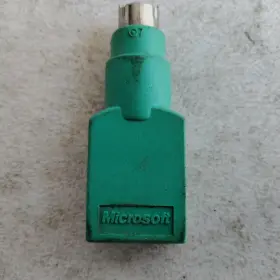
( Brand: Microsoft ), ( Manufacturer Part Number: USBPS2 ), ( Part Type: Adapter Mouse )
Review MICROSOFT Usb To Ps2 Adapter Green Vintage For Mouse
Microsoft USB to PS/2 Adapter for Mouse
Description:The Microsoft USB to PS/2 Adapter for Mouse is a versatile and practical solution designed to enable the use of a PS/2-style mouse with a modern computer that only supports USB peripherals. This adapter expands the connectivity options of your computer, ensuring compatibility with a wide range of legacy peripherals.
Design and Build:Measuring approximately 3.2 inches (8.6 cm) in length and featuring a sleek, compact design, the Microsoft USB to PS/2 Adapter for Mouse is a space-saving addition to your desktop setup. Its plug-and-play design makes it simple to use, with no driver installation required. The adapter is constructed from high-quality, durable materials to ensure reliable performance and long-lasting use.
Functionality:This USB to PS/2 adapter comes with a single PS/2 mouse connector, which can be used to connect a standard PS/2 mouse to a USB port on your computer. The adapter translates the PS/2 signals to USB, allowing the computer to recognize and communicate with the mouse effectively. With full support for both optical and ball-type mice, this adapter enables users to enjoy the functionality of their preferred PS/2 mouse with the convenience of a modern computer.
Compatibility:Compatible with Windows Vista, Windows 7, Windows 8, Windows 8.1, and Windows 10 operating systems, the Microsoft USB to PS/2 Adapter for Mouse is a must-have accessory for users who rely on a PS/2 mouse but need to connect it to a modern computer. It can also be used with various other operating systems, making it a versatile solution for users with diverse computing needs.
In summary, the Microsoft USB to PS/2 Adapter for Mouse is a practical and reliable solution for users who need to connect a PS/2-style mouse to a modern computer. Its compact design, easy setup, and broad compatibility make it an indispensable accessory for both personal and professional use.
The Microsoft USB PS/2 Adapter for Mouse is a device designed to allow users with modern USB-enabled computers to use older PS/2-style mice. Here are some pros and cons that might help you decide if this adapter is the right choice for you:
Pros:1. Compatibility: This adapter allows users to connect PS/2-style mice to newer computers that only have USB ports.
2. Plug-and-Play: The setup process is straightforward, and the device is generally considered to be a plug-and-play solution.
3. Reliable: Microsoft is a well-known and reputable brand, and users have reported that this adapter is reliable and sturdy.
4. Cost-Effective: Compared to other solutions, such as buying a new PS/2-compatible mouse or upgrading your computer, this adapter is a cost-effective option.
Cons:1. Limited Functionality: This adapter only supports mice, and it will not work with other types of PS/2 peripherals, such as keyboards.
2. Additional Cable Clutter: Using this adapter adds an additional cable to your setup, which some users may find inconvenient.
3. Potential Performance Issues: Some users have reported that this adapter can introduce input lag or other performance issues, which may impact their experience.
Conclusion:The Microsoft USB PS/2 Adapter for Mouse is a useful tool for users who need to connect an older PS/2-style mouse to a newer computer. While it has some limitations and potential drawbacks, such as the additional cable and potential performance issues, it is generally considered to be a reliable and cost-effective solution. If you need to use a PS/2-style mouse with a modern computer, this adapter is worth considering.
Recommendation:If you need to use a PS/2-style mouse with a modern computer, the Microsoft USB PS/2 Adapter for Mouse is a solid choice. It is easy to use, reliable, and cost-effective. However, if you prefer a wireless solution or if you need to use other PS/2 peripherals, you may want to consider other options. Ultimately, the best choice depends on your specific needs and preferences.
Details:
Tag-pl:::TRNK363: Microsoft USB To PS2 Adapter Green Vintage For Mouse:tag 0368:null.
part #: usbps2 prices
- $10.99-$285.45
specifications compocables:
- brand: Microsoft
- mpn: Usbps2
- part type: Adapter Mouse
returns compocables:
- method: Money back
- policy: Returns Accepted
- paid by: Seller
- time: 30 Days
seller compocables:
- rating: 100.0%
- city: Lakeport, California
- # reviews: 9148
offer compocables:
- options: Ship-to-home
- started: May 28, 2025
- quantity: 1
- sold: 0
- best offers: True
- availability: In Stock
payments compocables:
- other
- wallet: Paypal
- credit card: Visa
shipping compocables:
- service: Economy, Standard, Expedited
- cost: $5.83
- type: Fixed
- class: Economy, Standard, Expedited
- transit: 3-8 Days
general compocables:
- condition: Used
- Computers/Tablet's Networking > Computer Cables Connectors > Other Computer Cables
Microsoft USBPS2 Is Similar To:
- Microsoft Swv-00001 Usb-c Travel Hub Black (40.8% similar) Original packaging is slightly damaged. Items are tested and may have minor signs of handling. Packaging may be damaged. New open box...(January 16th, 2025)
- Microsoft M1023221-006 M1023221 Original Touch Sensor Connector Small Board For Surface Book 1 book 2 (34.6% similar) Original touch sensor connector small board for Microsoft surface book 1 /book if not brand new, there may be any or all of the following cosmetic flaws: scratches/wear/scuff/dents on sides, screen, back cover, near ports etc. Listed price is for...(January 20th, 2025)
- Microsoft 161-00001 Usb-c Travel Hub (44.2% similar) Microsoft surface usb-c travel hub new in sealed packaging hub...(January 29th, 2025)
- Microsoft X18-95830-01 Surface Mini Displayport To Hdmi 2.0 Adapter New (41.5% similar) The adapter allows you to connect a surface mini display port device an HDMI 2.0 port. The product is a surface mini display port to HDMI 2.0 adapter manufactured by Microsoft in china. It is a new and unused item...(March 3rd, 2025)
- Microsoft M1019389-001 Charging Dc Ac Jack Charge Connector Cable For Surface Laptop (33.6% similar) Charging dc ac jack charge connector cable for Microsoft surface laptop M1019389-001 laptop. Listing is for the item only. For part / component listings: part conditions: all parts are pulled from tested working units new units, open box or used units, unless stated otherwise in the listing...(January 22nd, 2026)
