DELL NGVT3 Inspiron Ribbon Cable Touchpad 5510
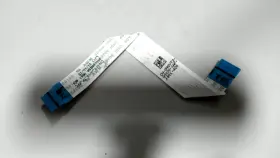
( Brand: Dell ), ( Manufacturer Part Number: NGVT3 ), ( Part Type: Touchpad Ribbon Cable )
Review DELL Inspiron Ribbon Cable For Touchpad
Dell NGVT3 Touchpad Ribbon Cable for Inspiron 15 5000 Series (5510)
Description:This Dell NGVT3 Touchpad Ribbon Cable is specifically designed for the Dell Inspiron 15 5000 Series laptops, model number 5510. If you're experiencing touchpad issues on your laptop or need a replacement cable, this is the exact part you've been looking for.
The ribbon cable measures approximately 10 inches (25.4 cm) in length and features a robust design to ensure reliable connectivity between the touchpad and the motherboard. The cable is made of high-quality materials that can withstand the rigors of daily use, providing a long-lasting solution for your laptop.
The Dell NGVT3 Touchpad Ribbon Cable comes with a simple and straightforward installation process. The connectors on the cable are keyed to ensure proper alignment during installation, eliminating the risk of incorrect connection. The cable is also pre-terminated, saving you the time and effort of soldering or crimping connectors.
By choosing this Dell NGVT3 Touchpad Ribbon Cable, you can restore the functionality of your laptop's touchpad, allowing you to navigate your system with ease and precision. This cable is compatible with various operating systems, including Windows 10, Windows 8, and Windows 7, making it a versatile solution for your laptop needs.
In conclusion, this Dell NGVT3 Touchpad Ribbon Cable is an essential component for your Dell Inspiron 15 5510 laptop. Its high-quality design, simple installation process, and compatibility with various operating systems make it an ideal choice for those seeking a reliable and effective solution to their touchpad issues.
Buying a Dell NGVT3 ribbon cable for the touchpad of an Inspiron 15 5510 laptop involves weighing the potential benefits against the cost. Here are some pros and cons to consider:
Pros:1. Improved Touchpad Functionality: A faulty or worn-out ribbon cable can cause touchpad issues, such as unresponsiveness or erratic behavior. Replacing the cable can restore the touchpad to its optimal performance.
2. Cost-Effective Solution: Replacing the ribbon cable is a more affordable option compared to buying a new laptop or even a touchpad.
3. DIY Repair: For those who enjoy tinkering with their devices, replacing the ribbon cable provides an opportunity to practice their repair skills.
Cons:1. Risk of Damage: Handling the delicate ribbon cable during replacement can result in unintentional damage, which may require additional repairs or replacement parts.
2. Time-Consuming Process: The ribbon cable replacement process can be time-consuming, especially for those who are not familiar with laptop disassembly.
3. Potential for Misalignment: Properly aligning the ribbon cable during installation is crucial to ensure proper touchpad functionality. Misalignment can lead to ongoing issues.
In conclusion, buying a Dell NGVT3 ribbon cable for the touchpad of an Inspiron 15 5510 laptop comes with both advantages and disadvantages. If you are comfortable with DIY repairs, have the necessary tools, and are willing to invest some time, replacing the ribbon cable can save you money and restore touchpad functionality. However, if you are not confident in your repair abilities or prefer a more straightforward solution, it may be worth considering other options, such as professional repair services or purchasing a new laptop. Ultimately, the decision depends on your technical expertise, budget, and personal preferences.
Details:
Item may show signs from previous installation. FOR LAPTOP BATTERY LISTINGS: Battery Conditions: All batteries are pulled from tested systems. Dell Inspiron 15 5510 Ribbon Cable for Touchpad - NGVT3. FOR PART / COMPONENT LISTINGS: Part Conditions: All parts are pulled from tested working units New units, Open Box or Used units, unless stated otherwise in the listing.
No accessories, cables, manuals, etc included, unless stated otherwise in the listings. New: 100%-90%. Each condition has a range of battery health percentages.: Brand Dell, MPN NGVT3, Condition Open Box.
Listing is for the item only.
part #: ngvt3 prices
- $10.99-$64.99
specifications compocables:
- brand: Dell
- mpn: Ngvt3
- part type: Touchpad Ribbon Cable
shipping compocables:
- transit: 2-5 Days
- type: Fixed
- cost: $5.00
- service: Standard
- class: Standard
payments compocables:
- credit card: Discover
- other
- wallet: Apple-pay
seller compocables:
- rating: 99.1%
- # reviews: 164265
- city: Macedonia, Ohio
offer compocables:
- started: January 22, 2026
- availability: In Stock
- sold: 0
- quantity: 3
- options: Ship-to-home
general compocables:
- condition: Open box
- Computers/Tablet's Networking > Computer Cables Connectors > Other Computer Cables
returns compocables:
- method: Money back
- time: 30 Days
- paid by: Seller
- policy: Returns Accepted
Dell NGVT3 Is Similar To:
- Dell 03gpf4 3gpf4 Dc02c00al00 Latitude 5510 Series Led Video Cable Dp n L6-20 (39.4% similar) Condition: used...(May 24th, 2024)
- Dell Dc02c00em00 Hd5fx Latitude 5480 Series Led Video Cable Dp n L6-14 (30.4% similar) Condition: used...(May 25th, 2024)
- Dell Vjp3j Dc02c00k200 Latitude 5511 Series Led Video Cable Dp n L6-11 (38.4% similar) Condition: used...(May 25th, 2024)
- Dell 48570-379-02mx-a00 Mini Sas To Dual Power Cable T3600 T5600 T7600 T3f4v (30.5% similar) Power cord included no, warranty 30 day warranty. Quick features: technician notes. Don't buy new. It has been cleaned and passed our testing with no issues. Only genuine software installed. Please look at the specifications tab for more details. Indecent started out in 2017 with a...(May 26th, 2024)
- Dell P4904 Oem Poweredge 2800 Tbu Scsi Controller Cable (34.5% similar) Compatible Dell desktop systems genuine oem parts only. Power edge server 2800. Depart number: P4904. Buyer pays return shipping. W a r n y - I f o m n, no hassle 60 day warranty...(May 26th, 2024)
- Dell 6wh77 Oem Inspiron Mini Duo 1090 Docking Station Internal Duaghter Io (43.4% similar) This is the internal daughter Io circuit board, with SD card reader, USB ports, audio port, and network JR-45 port; for the inspiron duo 1090 dock unit. Compatible Dell laptops/notebooks: inspiron mini duo 1090 docking station, Don: 6WH77, note: this is an internal daughter card for the...(May 26th, 2024)
- Dell Kvr0y Oem Alienware M17xr4 Wirelesshd Wihd Transmitter Circuit Board Cable (28.4% similar) As well as a wide receiver enabled device to transmit to; some HDTV have this feature built-in, and there are also stand alone devices that you can hook up your HDTV. The wide feature allows you to transmit, via wireless signal, movies and games an external display that has a receiver...(May 26th, 2024)
- Dell Y2j54 6jkg5 Inspiron 5490 Aio Desktop Power Button Board Cable Vfcyf Card Reader (47.1% similar) Functional condition: good working and cosmetic condition. Dell inspiron 5490 AI desktop power button board Y2J54 cable FSF card reader 6JKG5. Light signs of previous usage...(May 26th, 2024)
- Dell J4dfm Oem Alienware M14x Wirelesshd Wihd Transmitter Circuit Board Cable (27.3% similar) Buyer pays return shipping. Part numbers found on cable alb 0 cable. The wide feature allows you to transmit, via wireless signal, movies and games an external display that has a receiver. Alien ware M14X. W a r n y - I f o m n, no hassle 60 day warranty. Genuine oem parts only...(May 27th, 2024)
- Dell Xt623 Display Port To Dvi-d Cable Cn-0xt623 (38.8% similar) This Dell XT623 display port to div-d cable CNN-0XT623 enables seamless connectivity between your computer and display device. Designed by Dell and manufactured in china, this cable is compatible with a wide range of devices provides secure stable connection...(May 27th, 2024)
- Dell 1414-05n70q0 Genuine Optiplex 5400 All-in-one Touch Cable Tested (33.9% similar) We serialize everything. Serial number must match...(May 27th, 2024)
