NEWIEDKVM KM-H2020 Dual Monitor Kvm Switch Computers Hdmi Usb 4K 60HZ 3.0
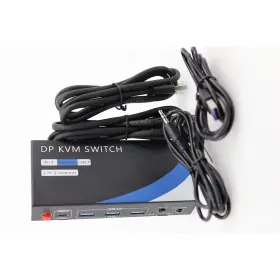
( Brand: Newiedkvm ), ( Manufacturer Part Number: KM-H2020 ), ( Part Type: Monitor Switch ), ( Color: Black ), ( Unit Type: Unit ), ( Country Of Origin: United States )
Review NEWIEDKVM Dual Monitor Kvm Switch Monitors Computers Hdmi 4k 60hz Usb 3.0
Introducing the NEW IEKVM KM-H2020 Dual Monitor KVM Switch, a versatile and high-performance solution for managing multiple computers with two monitors. This advanced KVM switch supports HDMI 4K 60Hz resolutions, enabling crystal-clear and high-definition visuals on both monitors.
The KM-H2020 is a dual monitor KVM switch, meaning it allows you to connect and control two separate computers using a single set of input devices, such as a keyboard and mouse. This setup is ideal for multitasking between multiple systems, reducing clutter on your desk, and improving overall productivity.
This KVM switch offers USB 3.0 connectivity, ensuring fast and efficient data transfer between the connected computers and peripherals. Moreover, it supports hot-plugging, allowing you to connect or disconnect USB devices without powering down the system.
One of the standout features of the KM-H2020 is its HDMI 4K 60Hz support. This means that each monitor can display a 4K resolution (3840x2160 pixels) at a 60Hz refresh rate, ensuring smooth and lag-free visuals. This feature is particularly beneficial for graphic designers, video editors, and gamers who require high-resolution and high-refresh-rate displays.
The KM-H2020 is also equipped with an audio switch, allowing you to easily toggle the audio output between the connected computers. This feature is especially convenient when making presentations or switching between different applications that require different audio sources.
The switch itself features a sleek and compact design, making it a great addition to any workspace. It comes with a user-friendly control panel, enabling you to easily switch between computers and adjust various settings, such as resolution and audio output.
The KM-H2020 also supports advanced features like automatic input detection, ensuring that the switch recognizes the connected computers and peripherals automatically. It also offers EDID (Extended Display Identification Data) emulation, ensuring that the connected monitors are displayed at their optimal resolution and color depth.
In summary, the NEW IEKVM KM-H2020 Dual Monitor KVM Switch is a powerful and versatile solution for managing multiple computers with two monitors. Its HDMI 4K 60Hz and USB 3.0 support, along with its advanced features and compact design, make it an excellent choice for anyone who requires a high-performance and efficient workspace setup.
Pros and Cons of Buying a KVM Switch: Newer Technology KM-H2020 Dual Monitor Model
Introduction:The Newer Technology KM-H2020 is a dual monitor KVM switch that supports HDMI 4K 60Hz and USB 3.0. This device allows users to control multiple computers using a single set of keyboard, mouse, and monitors. In this analysis, we will discuss the advantages and disadvantages of purchasing this KVM switch to help potential buyers make an informed decision.
Pros:1. Improved productivity: With the KM-H2020, users can easily switch between computers without having to physically move or disconnect peripherals. This saves time and increases overall productivity.
2. Cost-effective: Instead of purchasing multiple sets of peripherals, a single KVM switch can be used to control multiple computers, saving money in the long run.
3. Flexibility: Users can easily switch between computers to access different applications or projects, making it an ideal solution for multitasking or working with multiple systems.
4. 4K and 60Hz support: The KM-H2020 supports 4K resolution at 60Hz, which ensures a crisp and clear image on both monitors.
5. USB 3.0 connectivity: The USB 3.0 ports allow for faster data transfer rates, making it a suitable option for power users or those working with large files.
Cons:1. Limited compatibility: The KM-H2020 may not be compatible with all computers or peripherals, so it's essential to check the specifications before making a purchase.
2. Potential for input lag: Some users have reported experiencing input lag, which can be frustrating for gamers or those who require fast response times.
3. Price: Compared to basic KVM switches, the KM-H2020 is more expensive due to its advanced features such as 4K and USB 3.0 support.
4. Complex setup: Setting up the KM-H2020 can be a complex process, and users may need to consult the manual or online resources for assistance.
Conclusion:The Newer Technology KM-H2020 dual monitor KVM switch offers several advantages, such as improved productivity, cost savings, flexibility, 4K and 60Hz support, and USB 3.0 connectivity. However, potential drawbacks include limited compatibility, potential input lag, a complex setup process, and a higher price point than basic KVM switches. Ultimately, the decision to purchase the KM-H2020 depends on an individual's specific needs and requirements.
Recommendation:If you require a KVM switch for basic computing tasks and do not need the advanced features of the KM-H2020, consider a more affordable option. However, if you work with multiple computers and require 4K resolution, USB 3.0 support, and the ability to switch between systems easily, the Newer Technology KM-H2020 may be an excellent investment for increased productivity and cost savings.
Details:
Enhance your electronic workspace even further by exploring our full electronics Collection for more products like this one. This is great for watching videos, editing images, or gaming. Or use the wired remote for more flexibility. This feature helps users compare data, copy files, or multitask across platforms more efficiently.
As shown in this Wikipedia article, KVM switches are trusted many industries. Answer: The KVM switch supports up to 4K resolution at 60Hz. HD video streams look smooth and clear. The plug-and-play design means you don't have to install any software.
Installation takes just a few minutes. Video editors, designers, and data analysts will find this switch perfect for demanding visual tasks. Answer: This switch is designed for two monitors. Answer: Yes, it works with Marcos, Windows, Linux, and Unix.
Summary: Streamline your workflow. Choose the best method for your workflow. Control two computers using one keyboard, mouse, and monitors with this KVM switch. This switch supports vivid images with 4K resolution at 60Hz.
Make your workspace smarter with this Dual Monitor KVM Switch. Use the same set of peripherals to manage both systems easily. Both buttons and remote provide instant switching access. If you work with detailed images or need crisp text, the switch delivers reliable picture quality on every monitor.
Use the built-in USB 3.0 ports for fast data transfers. Its also supported by most standard USB devices. Both computers can use separate screens at the same time. This KVM switch offers broad compatibility.
Question: Is the KVM switch compatible with Marcos. It is perfect for home offices, graphic studios, or anyone with dual PC workstations. Follow the step-by-step guide in user manual. Keywords: KVM, switch, dual, monitor.
Mac users, especially those working with creative suites, will benefit from seamless integration. Make sure that your computers and monitors both support dual display through HDMI for the best experience. The device will integrate into almost any office or home setup. FAQ, - Question: Does this KVM switch support dual monitor setups.
It supports Windows, Marcos, Linux, and Unix systems. The KVM switch is simple to set up. Connect your Mac and PC for flexible work environments. All pieces are included.
Set up is quick and switching easy. This design helps keep your workspace clean and efficient. Streamline your workspace. Get started right away, even if you are new to KVM technology.
They are known for boosting efficiency and reducing desk clutter. Colors stay vibrant and details remain crisp. These ports support speeds up to 5Gbps. Question: What resolutions does this KVM switch support.
HDMI ports make it easy to connect high-end screens. That allows you to view and control two operating systems side-by-side. Switch easily between business and personal computers. Switch between your computers using the front panel buttons.
Boost productivity while keeping your desktop clear and organized. There is no sign of damage. Each monitor displays sharp visuals.
specifications compocables:
- brand: Newiedkvm
- mpn: Km-h2020
- part type: Monitor Switch
- color: Black
- unit type: Unit
- country of origin: United States
payments compocables:
- wallet: Paypal
- credit card: Mastercard
- other
shipping compocables:
- service: UPS Ground Saver, USPS Ground Advantage
- type: Calculated
- carrier: UPS, USPS
- cost: $0.00
- class: Economy, Standard
- transit: 5-11 Days
general compocables:
- Computers/Tablet's Networking > Computer Cables Connectors > Other Computer Cables
- condition: Open box
returns compocables:
- method: Money back
- time: 30 Days
- paid by: Seller
- policy: Returns Accepted
offer compocables:
- started: February 1, 2026
- best offers: True
- sold: 0
- quantity: 1
- availability: In Stock
- options: Ship-to-home
seller compocables:
- city: Sutton, Massachusetts
- rating: 98.5%
- # reviews: 461
