DELL 9CKJ5 Kvm Usb Switch Sip Cim Module Cable 520-294-506
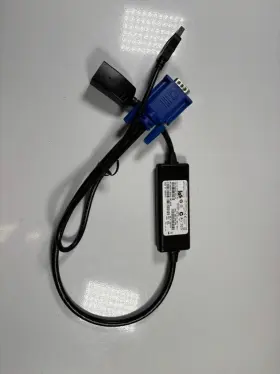
( Brand: Dell ), ( Manufacturer Part Number: 9CKJ5 ), ( Part Type: Switch Module Cable )
Review DELL Genuine Kvm Usb Switch Pod Sip Cim Module Cable
The Dell KVM (Keyboard, Video, Mouse) USB Switch SIP (Single Input Point) CIM (Common Interconnect Module) Cable 520-294-506 is a versatile solution designed for managing multiple computers using a single set of peripherals. This cable is specifically engineered for Dell systems and integrates seamlessly with Dell KVM switches.
The cable features a Single Input Point (SIP) design, which allows you to connect one set of peripherals, such as a keyboard, mouse, and monitor, to the KVM switch. Meanwhile, you can connect multiple computers to the switch using separate cables. The cable supports USB 2.0 data transfer rates, enabling fast and efficient communication between the connected devices.
This cable includes a CIM module that complies with the Common Interconnect Form Factor Specification (CIFS). CIFS ensures compatibility with other manufacturers' KVM switches and simplifies the process of integrating this cable into your setup, even if your system is not a Dell.
The KVM cable resides on a 0.5 meter (1.64 feet) cable length and has been built using high-quality materials to ensure reliable and durable performance. The cable provides for smooth and responsive data transfer, ensuring a seamless experience when switching between computers. Additionally, the cable is backed by Dell's commitment to quality, giving you peace of mind in your investment.
To summarize, the Dell KVM USB Switch SIP CIM Module Cable 520-294-506 is an essential tool for managing multiple computers with a single set of peripherals. Its Single Input Point design, USB 2.0 compatibility, and Common Interconnect Module support offer flexibility and versatility in various computing environments. With a robust construction and superior data transfer capabilities, this cable is a practical choice for enhancing productivity and streamlining your workspace.
Pros and Cons of Buying Dell KVM Switch with SIP CIM Module Cable (520-294-506)
The Dell KVM switch with SIP CIM Module Cable (520-294-506) is a product designed to simplify the management of multiple computers by allowing you to control them using a single keyboard, video display, and mouse. This accessory can be beneficial for businesses or individuals who deal with multiple computers. This article presents the pros and cons of investing in this KVM switch.
Pros:1. Centralized Control: Manage multiple computers from a single workstation using just one keyboard, mouse, and monitor. The KVM switch allows for easy switching between the connected systems.
2. Improved Productivity: With centralized control, you can multitask more efficiently, reducing the need to move between computers or keep multiple monitors.
3. Time-Saving: The KVM switch eliminates the need to manually switch your hardware inputs on your monitor and peripherals for each connected computer, leading to time savings.
4. Reduced Clutter: Consolidating the need for multiple keyboards, monitors, and mice for different computers leads to a cleaner and more organized workspace.
5. Enhanced Security: Since you only need to remain focused on one keyboard and monitor, the risk of unintentional access to confidential information on other computers is minimized.
Cons:1. Expensive: KVM switches, especially those with advanced features like the included SIP CIM Module, can be pricey. The Dell 520-294-506 model may not be budget-friendly for everyone.
2. Limited Number of Ports: Depending on your specific needs, having only a few ports for connecting multiple computers may not suffice; requiring additional KVM switches if you need to manage more systems.
3. Compatibility Issues: Although the Dell KVM Switch is specifically designed for Dell systems, older or specific models may not be compatible. Ensure you confirm compatibility before making a purchase.
Conclusion:When considering purchasing the Dell KVM Switch with SIP CIM Module Cable (520-294-506), evaluating both the advantages and disadvantages can help determine if this is the right investment for you. The pros, such as centralized control, productivity improvement, time-saving, reduced clutter, and enhanced security, outweigh the cons, which are mainly the expense, limited number of ports, and potential compatibility issues. If the benefits align with your requirements and budget, investing in the Dell 520-294-506 KVM switch can significantly streamline your workflow. However, if compatibility concerns or budget limitations pose issues, you may consider exploring other alternatives.
Recommendation:If you find that the Dell KVM Switch with SIP CIM Module Cable (520-294-506) does not meet your requirements or is not within your budget, you may explore alternatives such as:
1. USB Hubs with KVM functionality to share peripherals between multiple computers.
2. Affordable KVM switches from other manufacturers that offer similar functionality.
3. Cloud-based or virtualization solutions like Remote Desktop or TeamViewer to access and manage computers remotely.
Do remember that each solution may bring its unique advantages and trade-offs; carefully evaluate your needs and resources to make an informed decision.
Details:
Genuine Dell KVM USB Switch POD SIP CIM Module Cable, P/N: 520-294-506DP/N: 9CKJ5 DP/N.
part #: 9ckj5 prices
- $15.00-$75.00
specifications compocables:
- brand: Dell
- mpn: 9ckj5
- part type: Switch Module Cable
returns compocables:
- paid by: Buyer
- time: 30 Days
- method: Money back
- policy: Returns Accepted
shipping compocables:
- carrier: USPS
- service: USPS Ground Advantage
- cost: $0.00
- class: Standard
- transit: 4-10 Days
- type: Fixed
seller compocables:
- city: Hampstead, Maryland
- rating: 100.0%
- # reviews: 990
payments compocables:
- other
- credit card: Diners-club
- wallet: Paypal
general compocables:
- Computers/Tablet's Networking > Computer Cables Connectors > Other Computer Cables
- condition: New
offer compocables:
- started: February 2, 2025
- availability: In Stock
- quantity: 1
- sold: 0
- options: Ship-to-home
Dell 9CKJ5 Is Similar To:
- Dell 03gpf4 3gpf4 Dc02c00al00 Latitude 5510 Series Led Video Cable Dp n L6-20 (32.7% similar) Condition: used...(May 24th, 2024)
- Dell Dc02c00em00 Hd5fx Latitude 5480 Series Led Video Cable Dp n L6-14 (34.3% similar) Condition: used...(May 25th, 2024)
- Dell Vjp3j Dc02c00k200 Latitude 5511 Series Led Video Cable Dp n L6-11 (31.4% similar) Condition: used...(May 25th, 2024)
- Dell 48570-379-02mx-a00 Mini Sas To Dual Power Cable T3600 T5600 T7600 T3f4v (31.5% similar) Power cord included no, warranty 30 day warranty. Quick features: technician notes. Don't buy new. It has been cleaned and passed our testing with no issues. Only genuine software installed. Please look at the specifications tab for more details. Indecent started out in 2017 with a...(May 26th, 2024)
- Dell P4904 Oem Poweredge 2800 Tbu Scsi Controller Cable (43.2% similar) Compatible Dell desktop systems genuine oem parts only. Power edge server 2800. Depart number: P4904. Buyer pays return shipping. W a r n y - I f o m n, no hassle 60 day warranty...(May 26th, 2024)
- Dell Kvr0y Oem Alienware M17xr4 Wirelesshd Wihd Transmitter Circuit Board Cable (32.2% similar) As well as a wide receiver enabled device to transmit to; some HDTV have this feature built-in, and there are also stand alone devices that you can hook up your HDTV. The wide feature allows you to transmit, via wireless signal, movies and games an external display that has a receiver...(May 26th, 2024)
- Dell Y2j54 6jkg5 Inspiron 5490 Aio Desktop Power Button Board Cable Vfcyf Card Reader (29.7% similar) Functional condition: good working and cosmetic condition. Dell inspiring 5490 AI desktop power button board Y2J54 cable FSF card reader 6JKG5. Light signs of previous usage...(May 26th, 2024)
- Dell J4dfm Oem Alienware M14x Wirelesshd Wihd Transmitter Circuit Board Cable (31.3% similar) Buyer pays return shipping. Part numbers found on cable alb 0 cable. The wide feature allows you to transmit, via wireless signal, movies and games an external display that has a receiver. Alien ware M14X. W a r n y - I f o m n, no hassle 60 day warranty. Genuine oem parts only...(May 27th, 2024)
- Dell Xt623 Display Port To Dvi-d Cable Cn-0xt623 (37.3% similar) This Dell XT623 display port to div-d cable CNN-0XT623 enables seamless connectivity between your computer and display device. Designed by Dell and manufactured in china, this cable is compatible with a wide range of devices provides secure stable connection...(May 27th, 2024)
- Dell 1414-05n70q0 Genuine Optiplex 5400 All-in-one Touch Cable Tested (38.8% similar) We serialize everything. Serial number must match...(May 27th, 2024)
- Dell 450.09w05.0011 Inspiron 3567 Series Dc Jack With Cable P68-18 (32.4% similar) Condition: used...(May 27th, 2024)
