HP 804290-001 Front Panel Usb Module Dual Ports Power Cables I/o Power/reset Buttons
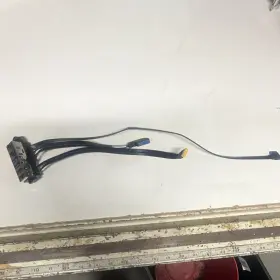
( Brand: Hp ), ( Manufacturer Part Number: 804290-001 ), ( Part Type: Panel Module Button Cable )
Review HP Pc Front Panel Usb I/o Module Dual Ports Power/reset Buttons Cables
The HP 804290-001 Front Panel USB I/O Module is an essential addition to any HP server or workstation that requires extra USB ports and power/reset buttons. This dual-port I/O module is designed to fit into standard 5.25-inch front bay slots, making it a versatile and space-efficient solution.
The module comes with two USB 2.0 ports, allowing you to connect multiple peripherals, such as keyboards, mice, or external storage devices, to your server or workstation. Each port is capable of delivering a maximum data transfer rate of up to 480 Mbps, ensuring fast and reliable data transfer.
In addition to the USB ports, this module also features two power/reset buttons. These buttons can be used to manually power on or off the connected devices, making it convenient for managing external devices without having to access the server or workstation directly. The power button also has a built-in LED indicator to show the power status.
The module is equipped with a flat ribbon cable that connects to the motherboard of the server or workstation. The length of the cable is approximately 30 cm (12 inches), providing enough flexibility to reach the required connections. The cable comes with a locking mechanism to ensure a secure connection and prevent accidental disconnections.
The HP 804290-001 Front Panel USB I/O Module is compatible with various HP ProLiant and DL series servers, as well as some HP workstations. It is designed to meet the rigorous demands of enterprise-level environments, ensuring reliable and stable performance.
In summary, the HP 804290-001 Front Panel USB I/O Module is a versatile and practical solution for expanding the I/O capabilities of your HP server or workstation. With its two USB 2.0 ports, two power/reset buttons, and robust design, it is an essential tool for managing external devices and ensuring seamless connectivity.
The HP 804290-001 Front Panel USB I/O Module is a dual-port USB expansion for HP servers, providing additional USB ports for connecting peripherals such as keyboards, mice, or storage devices. Here are some potential pros and cons of purchasing this module:
Pros:1. Adds two USB 2.0 ports to the server, increasing the total number of available USB ports.
2. Allows for the integration of newer peripherals, such as USB-enabled storage devices or keyboards, into older HP servers that may not have native USB support.
3. Provides power and reset buttons for easier management of connected devices.
4. Compatible with a wide range of HP ProLiant and BL460c series servers.
Cons:1. Requires some level of technical expertise for installation, as it involves opening the server chassis and connecting cables.
2. May not be necessary for all users, as some servers may already have sufficient USB ports for their needs.
3. Additional cost for the module and installation labor, if not performed in-house.
In conclusion, the HP 804290-001 Front Panel USB I/O Module can be a useful addition to HP servers that require additional USB ports or have no native USB support. However, it may not be necessary for all users, and the installation process requires some level of technical expertise. Ultimately, the decision to purchase this module depends on the specific needs and resources of the organization.
If you have determined that the HP 804290-001 Front Panel USB I/O Module is the best solution for your server, it is recommended to ensure that you have the necessary technical expertise or resources for installation, and to carefully follow the installation instructions provided by HP. Additionally, it may be a good idea to consider purchasing the module from a reputable supplier, such as an authorized HP reseller, to ensure authenticity and compatibility with your server model.
Details:
PC Front Panel USB I/O Module Dual Ports Power/Reset Buttons w/ Cables.
part #: 804290001 prices
- $11.99-$35.08
specifications compocables:
- brand: Hp
- mpn: 804290-001
- part type: Panel Module Button Cable
seller compocables:
- rating: 100.0%
- city: Sacramento, California
- # reviews: 17
shipping compocables:
- cost: $5.97
- service: USPS Ground Advantage
- class: Standard
- carrier: USPS
- type: Calculated
- transit: 13-20 Days
returns compocables:
- policy: No Returns
offer compocables:
- started: June 9, 2026
- availability: In Stock
- options: Ship-to-home
- quantity: 1
- best offers: True
- sold: 0
payments compocables:
- credit card: Mastercard
- money order
- wallet: Apple-pay
- other
general compocables:
- condition: Used
- Computers/Tablet's Networking > Computer Cables Connectors > Other Computer Cables
Hp 804290-001 Is Similar To:
- Hp 100110r00-519-g Engage Flex Pro-c Front I o Power Switch Usb Ports Assembly (41.5% similar) 100110R00-519-G Hp engage flex pro-c front i/o power switch usb ports assembly...(May 25th, 2024)
- Hp 732031-001 Z640 Workstation Power Cable Connector Front I o Usb (32.9% similar) 100% working. Pulled from Hp Z640 workstation...(May 25th, 2024)
- Cisco 7457-0301 Bundle Of 5 Cables 2 Molex 74547-0301 74547-0302 Hp Cl2 75c Cisco 7457 (22.1% similar) Our units are sold/shipped with a completely clean/wiped hard rive so the unit will give this kind of message until an OS is loaded. It does not cover cosmetic damage or software issues. X1 mole 74547-0302 cable. It means an operating system needs to be loaded on the unit. This is not a...(May 25th, 2024)
- Hp 510974-001 Genuine Compaq 600 Pro Sff Pc Front I o Audio Usb Panel Connector (33.9% similar) Shipped with USPS ground advantage. Genuine Hp Compaq 600 pro FSF pc front i/o audio usb panel connector 510974-001. Condition is used...(May 27th, 2024)
- Hp 594765-001 Spare 582753-001 Proliant Dl580 G7 Sas Backplane Power Cable (38.8% similar) Shipped with USPS ground advantage. 594765-001 Hp 582751-001 pliant DL580 g7 SARS back plane power cable. Condition is used...(May 27th, 2024)
- Hp L15907-001 Z4 Z6 G4 Pci Graphics Card Power Cable 10-pin To Dual 6 2 Pin (34.8% similar) Orders must be prepaid before or at time of pickup. Hp L15907-001 z4 z6 g4 pic graphics card power cable 10-PIN to dual 6/2 pin...(June 25th, 2024)
- Foxconn 018-0928-001 Sgi Silicon Graphics Hp 48v Rs485 Server Power Cable (31.9% similar) This cable is approximately two meters in length . No warranty or guarantee is offered unless explicitly stated above. Cash on pickup is accepted. 48V power cable for silicon graphics / Hp server, p/n: 018-0928-001. Specializing in retro-computing, antiques, collectibles, and other...(June 27th, 2024)
- Hp Sff8087 Adapter Cable Kvm Port Usb Vga 409496-001 416003-001 For C3000 C7000 (21.8% similar) The SFF8643 to SFF8087 model is compatible with a wide range of brands and perfect for Hp C3000 C7000 model's. Package: 1 x adapter cable km port usb VGA 409496-001 416003-001 for Hp C3000 C7000 this adapter cable is a versatile solution for your computing needs. The cable is designed for easy...(July 29th, 2024)
- Hp 661398-001 Proliant Ml350p G8 Front I o Panel And Cables (42.8% similar) Hp 661398-001 pliant ML350P g8 front i/o panel cables, tested, working...(August 2nd, 2024)
- Hp 810636-001 Prodesk 400 G3 Sff Front I o Cable Assembly (39.2% similar) Hp pro desk 400 g3 FSF front i/o cable assembly 810636-001, pre-owned, pulled from working pc's, excellent condition...(August 3rd, 2024)
- Hp N13301-001 Cable Usb (27.5% similar) New: 100%-90%.: brand Hp, mpn N13301-001, condition open box. Cable usb N13301-001 usb. Listing is for the item only. No accessories, cables, manuals, etc included, unless stated otherwise in the listings. For battery listings: battery conditions: all...(August 14th, 2024)
