HP 5070-2940 Pavilion Media Center Desktop Power Switch Cable M8307C
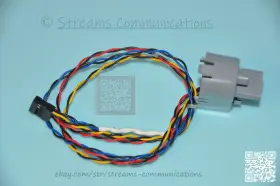
( Brand: Hp ), ( Manufacturer Part Number: 5070-2940 ), ( Part Type: Switch Cable Button )
Review HP Pavilion Media Desktop Pc Power Button Switch Cable
The HP 5070-2940 Pavilion Media Center M8307c Desktop Power Switch Cable is an essential accessory for managing power to your HP Media Center PC. Designed specifically for the HP Pavilion Media Center M8307c, this cable enables you to turn your system on or off using the power switch located on the front of the case.
constructed of high-quality materials, this power switch cable boasts a durable design that can withstand frequent use. Its slim and flexible form factor allows it to blend seamlessly with the aesthetics of your Media Center PC. The cable measures approximately 11 inches (28 cm) in length, providing ample reach to connect the power switch to the power supply unit located at the back of the case.
The HP 5070-2940 Desktop Power Switch Cable is easy to install. Simply connect one end of the cable to the power switch on the front of the Media Center case, and connect the other end to the power supply unit. Once connected, you can use the power switch to conveniently turn your system on or off, without the need to reach around the back of the case to press the power button.
This cable is a must-have for anyone who uses their Media Center PC frequently and wants to make power management more convenient. It is also a great accessory for those who may have difficulty reaching the power button on the back of the case due to its compact design and location. With its reliable performance and sleek design, the HP 5070-2940 Pavilion Media Center M8307c Desktop Power Switch Cable is an excellent investment for anyone who wants to enhance their Media Center experience.
The HP 5070-2940 Pavilion Media Center M8307c Desktop Power Switch Cable is an accessory designed to replace the original power switch cable of certain HP Media Center PCs. Here are some potential pros and cons of buying this part:
Pros:1. Convenience: Replacing a faulty or damaged power switch cable can save you the trouble of having to power on and off your PC using the power button on the case or the power supply unit.
2. Energy savings: Instead of having to press the power button each time you want to turn on or off your PC, you can use the power switch cable to put your PC in standby mode, which can help save energy.
3. Cost-effective: Replacing the power switch cable is often a more cost-effective option than replacing the entire power supply unit or the motherboard, which can be quite expensive.
Cons:1. Compatibility: Make sure that the HP 5070-2940 power switch cable is compatible with your specific HP Media Center PC model before making a purchase.
2. Availability: This part may not be readily available at local computer stores or electronics retailers, so you may have to order it online.
3. Installation: Installing the new power switch cable may require some technical skills, especially if you're not familiar with opening up your PC case and connecting cables.
Conclusion:The HP 5070-2940 Pavilion Media Center M8307c Desktop Power Switch Cable can be a useful accessory for HP Media Center PC users who want to replace a faulty or damaged power switch cable, or who want to add the convenience of being able to put their PC in standby mode using a power switch. However, it's important to ensure compatibility and availability before making a purchase, and to be prepared for the installation process.
Recommendation:If you're in need of a new power switch cable for your HP Media Center PC and you've confirmed that the HP 5070-2940 model is compatible with your specific PC model, then this part is a worthwhile investment for the convenience and energy savings it offers. However, if you're not comfortable with the installation process or if you're unable to confirm compatibility, it may be best to consult with a professional technician or to consider other repair or upgrade options.
Details:
Laptop Part Number. Item Condition, This item is in Good Working Condition. Replacement / Exchange option available. Prompt Service and Repair for Laptops other devices.
All product names, logos, and brands are property of their respective owners. Product exchange or replacement can be accepted for defective items, the same exact item only. 30-Day Warranty on most items.
part #: 50702940 prices
- $18.59-$34.10
specifications compocables:
- brand: Hp
- mpn: 5070-2940
- part type: Switch Cable Button
general compocables:
- Computers/Tablet's Networking > Computer Cables Connectors > Other Computer Cables
- condition: Used
payments compocables:
- wallet: Paypal
- other
- credit card: Discover
seller compocables:
- rating: 99.7%
- # reviews: 11693
- city: Kennesaw, Georgia
offer compocables:
- availability: In Stock
- options: Ship-to-home
- started: December 12, 2025
- sold: 0
- quantity: 1
returns compocables:
- time: 30 Days
- policy: Returns Accepted
- method: Money back
- paid by: Buyer
shipping compocables:
- cost: $10.99
- type: Fixed
- carrier: USPS
- class: Economy, Expedited, One-day
- service: Economy, USPS Priority Mail, Overnight
- transit: 4-7 Days
Hp 5070-2940 Is Similar To:
- Hp 73930-0102 Molex Shortwave Fiber Channel Cable 17-05157-04 And 2m Fc Copper (27.3% similar) Mole shortwave fiber channel cable 17-05157-04 73930-0102 Hp 2m FCC copper...(May 24th, 2024)
- Hp 8120-5678 Dtc Terminal Server Interconnect Cable For Vtg 16mx 16rx (35.5% similar) Part #: Hp 8120-5678 for sale...(May 24th, 2024)
- Hp 8120-5677 Dtc Terminal Server Interconnect Cable For Vtg 16mx 16tn (35.5% similar) Part #: Hp 8120-5677 for sale...(May 25th, 2024)
- Hp 100110r00-519-g Engage Flex Pro-c Front I o Power Switch Usb Ports Assembly (38.5% similar) 100110R00-519-G Hp engage flex pro-c front i/o power switch USB ports assembly...(May 25th, 2024)
- Hp 732031-001 Z640 Workstation Power Cable Connector Front I o Usb (32.2% similar) 100% working. Pulled from Hp Z640 workstation...(May 25th, 2024)
- Hp 407344-002 2x Molex 1m External Mini Sas To Cable (37% similar) Rest assured that it has been thoroughly inspected to ensure functions properly...(May 25th, 2024)
- Hp Compaq 179056-001 Hp compaq Wake-up-lan 10in Cable Assembly 3-pin (24.8% similar) Part #: Hp / Compaq 179056-001 for sale...(May 25th, 2024)
- Hp 911662-001 Genuine Eliteone 800 G3 All-in-one Backlight Cable 1414-0b0n000 (27.5% similar) Serial number must match. We serialize everything...(May 26th, 2024)
- Hp 410754-001 Proliant Dl360 G5 80 Way Ribbon Cable 6017b0065901 (36.7% similar) Hp pliant DL360 g5 80 way ribbon cable: part NUMBER410754-001 / 6017B0065901, ribbon cable, brand Hp, condition used. All the logos used are propriety to their respective owners and technology trader does not have any authority over them. Technology trader is an...(May 27th, 2024)
- Hp 40242-60025 Cable De68050-1 3 Pin Connector (18.6% similar) Connector only has 3 pins. Please buy if you know what are buying as I cannot provide support with this product. Guaranteed working. Cosmetic condition of unit is as shown in photos. This is an extremely rare cable and information about it scarce...(May 27th, 2024)
- Hp 660706-001 Dl380p Gen8 Mini Sas Ribbon Cable 675610-001 (35.5% similar) SARS ribbon cable for Hp DL380 server...(May 27th, 2024)
