DELL 0X1TXC Optiplex Lcd Touch Cable
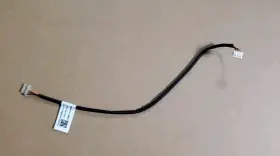
( Brand: Dell ), ( Manufacturer Part Number: 0X1TXC ), ( Part Type: Lcd Cable )
Review DELL Optiplex Lcd Touch Cable
The Dell 0X1TXC OptiPlex 24 Touch Cable is an essential accessory for users of Dell OptiPlex 24 desktop computers who wish to take advantage of the optional touchscreen functionality. This high-quality cable enables users to connect their PC to a Dell P2418H or P2418HT 23.8-inch touch IPS monitor, delivering a responsive and intuitive touch experience.
The cable itself is robust and well-constructed, featuring a length of approximately 0.9 meters (2.95 feet). It is shielded to protect against electromagnetic interference and comes with a velcro strap for easy cable management. One end of the cable connects to the touchscreen monitor, while the other end connects to the touch controller module located on the OptiPlex 24 desktop system.
The Dell 0X1TXC OptiPlex 24 Touch Cable supports Wacom AES 1.0 touch technology, providing accurate and reliable touch input. This technology has a low parallax and supports up to 10 points of touch, making it suitable for multitasking and collaboration.
Adding this cable to your Dell OptiPlex 24 setup not only unlocks the touch functionality of your monitor but also enhances the overall user experience. With a touchscreen display, users can navigate through Windows 10 or other operating systems with more efficiency, interact with applications more intuitively, and have greater control over their work or entertainment environment.
In summary, the Dell 0X1TXC OptiPlex 24 Touch Cable is a vital accessory for Dell OptiPlex 24 desktop users seeking to take full advantage of their touchscreen monitor. Its robust construction, accurate touch technology, and ease of use make it an indispensable addition to any Dell OptiPlex 24 setup.
Buying a Dell 0X1TXC Optiplex 24 LCD Touch Cable can be a great investment for users of Dell Optiplex 24 desktops who require a touchscreen functionality. Here are the pros and cons of purchasing this cable:
Pros:1. Enhanced User Experience: Adding a touchscreen capability to your Optiplex 24 deskTOP can make your computing experience more interactive and intuitive, especially if you work in graphic design, engineering, or other fields where touch functions are beneficial.
2. Improved Productivity: With a touchscreen, you can complete tasks faster and more efficiently. For instance, you can drag and drop files, type, write, and navigate through menus with just a tap.
3. Versatility: The touchscreen functionality also enables you to use applications designed specifically for touch screens, such as Microsoft Office, Google Chrome, and the latest web apps.
4. Compatibility: Dell is well-known for ensuring that its products are compatible with one another. The Optiplex 24 LCD Touch Cable is specifically designed and engineered for Dell Optiplex 24 desktops and comes with a one-year limited hardware warranty.
5. Competitive Pricing: Despite offering touchscreen functionality, the cost of this cable is relatively reasonable compared to other touchscreen monitors or all-in-one desktops with built-in touchscreens.
Cons:1. Additional Cost: Upgrading your Optiplex 24 to a touchscreen setup requires the purchase of the Dell 0X1TXC cable, which may add to your initial investment.
2. Limited Viewing Angles: Touchscreens can sometimes have limited viewing angles, meaning that the touch functions may not work correctly if you're not directly in front of the display and looking at it head-on.
3. Higher Power Consumption: Touchscreens require more power compared to standard monitors, which may increase your electricity bill over time.
4. Potential Compatibility Issues: Some software applications may not be optimized for touchscreens, leading to potential compatibility issues or requiring additional driver installations.
5. Limited Resolution: While the touchscreen version of the Dell Optiplex 24 monitor supports a maximum resolution of 1920 x 1080 pixels, some high-end applications and gaming might benefit from higher resolutions, such as 4K.
Conclusion: The addition of a touchscreen to your Dell Optiplex 24 desktop using the Dell 0X1TXC cable can bring numerous benefits, including an enhanced user experience, improved productivity, and versatility. However, this upgrade comes with a few potential downsides, such as additional costs, limited viewing angles, higher power consumption, potential compatibility issues, and lower resolution compared to high-end touchscreen displays. Ultimately, it's essential to consider how these pros and cons align with your specific use case and if the benefits outweigh the costs.
Recommendation: If you're looking for a touchscreen upgrade for your Dell Optiplex 24 desktop and frequently use applications or tasks that benefit from touchscreen functionality, investing in the Dell 0X1TXC Optiplex 24 LCD Touch cable could be an excellent choice. However, if you're unsure about the benefits or have compatibility concerns, consider testing the touch function on a friend's or colleague's system or performing thorough research on the software and hardware compatibility.
Details:
Dell Optiplex 24 LCD Touch Cable 0X1TXC.
part #: 0x1txc prices
- $20.50-$28.99
specifications compocables:
- brand: Dell
- mpn: 0x1txc
- part type: Lcd Cable
shipping compocables:
- type: Calculated
- class: Standard
- service: USPS Ground Advantage
- carrier: USPS
- cost: $0.00
- transit: 4-12 Days
returns compocables:
- policy: Returns Accepted
- paid by: Seller
- time: 30 Days
- method: Money back
seller compocables:
- city: Fort Myers, Florida
- # reviews: 264
- rating: 90.0%
payments compocables:
- other
- credit card: Mastercard
- wallet: Google-pay
general compocables:
- Computers/Tablet's Networking > Computer Cables Connectors > Other Computer Cables
- condition: Used
offer compocables:
- started: January 13, 2025
- sold: 0
- availability: In Stock
- quantity: 1
- options: Ship-to-home
- best offers: True
Dell 0X1TXC Is Similar To:
- Dell 03gpf4 3gpf4 Dc02c00al00 Latitude 5510 Series Led Video Cable Dp n L6-20 (32.8% similar) Condition: used...(May 24th, 2024)
- Dell Dc02c00em00 Hd5fx Latitude 5480 Series Led Video Cable Dp n L6-14 (38.5% similar) Condition: used...(May 25th, 2024)
- Dell Vjp3j Dc02c00k200 Latitude 5511 Series Led Video Cable Dp n L6-11 (34.9% similar) Condition: used...(May 25th, 2024)
- Dell 48570-379-02mx-a00 Mini Sas To Dual Power Cable T3600 T5600 T7600 T3f4v (29.6% similar) Power cord included no, warranty 30 day warranty. Quick features: technician notes. Don't buy new. It has been cleaned and passed our testing with no issues. Only genuine software installed. Please look at the specifications tab for more details. Indecent started out in 2017 with a...(May 26th, 2024)
- Dell P4904 Oem Poweredge 2800 Tbu Scsi Controller Cable (40.4% similar) Compatible Dell desktop systems genuine oem parts only. Power edge server 2800. Depart number: P4904. Buyer pays return shipping. W a r n y - I f o m n, no hassle 60 day warranty...(May 26th, 2024)
- Dell Kvr0y Oem Alienware M17xr4 Wirelesshd Wihd Transmitter Circuit Board Cable (37.3% similar) As well as a wide receiver enabled device to transmit to; some HDTV have this feature built-in, and there are also stand alone devices that you can hook up your HDTV. The wide feature allows you to transmit, via wireless signal, movies and games an external display that has a receiver...(May 26th, 2024)
- Dell Y2j54 6jkg5 Inspiron 5490 Aio Desktop Power Button Board Cable Vfcyf Card Reader (27.4% similar) Functional condition: good working and cosmetic condition. Dell inspiring 5490 AI desktop power button board Y2J54 cable FSF card reader 6JKG5. Light signs of previous usage...(May 26th, 2024)
- Dell J4dfm Oem Alienware M14x Wirelesshd Wihd Transmitter Circuit Board Cable (36.2% similar) Buyer pays return shipping. Part numbers found on cable alb 0 cable. The wide feature allows you to transmit, via wireless signal, movies and games an external display that has a receiver. Alien ware M14X. W a r n y - I f o m n, no hassle 60 day warranty. Genuine oem parts only...(May 27th, 2024)
- Dell Xt623 Display Port To Dvi-d Cable Cn-0xt623 (46% similar) This Dell XT623 display port to div-d cable CNN-0XT623 enables seamless connectivity between your computer and display device. Designed by Dell and manufactured in china, this cable is compatible with a wide range of devices provides secure stable connection...(May 27th, 2024)
- Dell 1414-05n70q0 Genuine Optiplex 5400 All-in-one Touch Cable Tested (55.6% similar) We serialize everything. Serial number must match...(May 27th, 2024)
- Dell 450.09w05.0011 Inspiron 3567 Series Dc Jack With Cable P68-18 (34.3% similar) Condition: used...(May 27th, 2024)
